- TV Video Cables & Interconnects Items
- sku: 3389500120735622
- STARTECH 065030897631
065030897631 STARTECH Com Mst Hub Displayport Hdmi Triple Dp
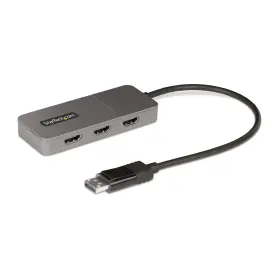
| Brand | STARTECH |
|---|---|
| Part Type | HUB MONITOR |
| Color | SPACE GRAY |
| Size | 3X HDMI |
| UPC | 065030897631 |
| Package Dimensions Lxwxh | 6.69X5.79X1.42 INCHES |
| Weight | 0.32 POUNDS |
Review STARTECH Startech.com 3-port Mst Hub Displayport To 3x Hdmi Triple 4k 60hz Monitors Dp 1.4 Mult
The StarTech.com 3-Port MST Hub with DisplayPort 3x HDMI (Model: MST3DPDP143H3) is a versatile and high-performance graphics solution designed to expand your DisplayPort connection to support three HDMI displays at once. Thisacknalbe hub is a must-have accessory for graphic designers, content creators, and power users who require a generous workspace spread across multiple monitors or need to drive multiple displays for presentations and gaming sessions.
This hub follows the DisplayPort MST (Multi-Stream Transport) standard, ensuring a seamless integration with your monitor setup. Each display can support resolutions up to 4K at 60Hz, making it perfect for running high-definition content on Ultra HD screens. The DisplayPort 1.4 compliance of the hub allows for the latest technologies, such as HDR (High Dynamic Range) and 4:4:4 chroma sampling, bringing a vibrant and stunning visual experience to your displays.
The hub features three independent DisplayPort outputs, each connecting to an HDMI input on your graphics card or laptop. Each port has an adjustable DisplayPort link calibration that optimizes the connection and ensures a reliable output signal. This adaptable design allows you to arrange your monitors as needed, and its compact, single-piece form factor saves valuable desk real estate.
Not only does the MST Hub with DisplayPort 3x HDMI support high resolutions and refresh rates, but it also offers bandwidth and data transfer rates that ensure smooth and responsive monitoring and interaction with multiple displays. It's an excellent choice for content creators and graphics professionals who need to have multiple monitors for increased productivity or gaming enthusiasts seeking an immersive multi-monitor setup for enhanced gaming experience.
Overall, the StarTech.com 3-Port MST Hub with DisplayPort 3x HDMI (Model: MST3DPDP143H3) is a reliable and performance-driven solution that magnifies your workspace and improves your multimedia experience. With 4K support at 60Hz, DisplayPort 1.4 compliance, and MST technology, this versatile hub serves as the missing link to unlock the potential of your multiple monitors.
Product: Startech.com 065030897631 3-port MST Hub - DisplayPort 3x HDMI, Triple 4K 60Hz
Pros:1. Supports triple 4K 60Hz displays, allowing for an enhanced and immersive viewing experience.
2. DisplayPort 1.4 technology ensures reliable and fast data transfer between the hub and connected displays.
3. MST (Multi-Stream Transport) technology enables each port to act as an independent display output.
4. HDMI ports provide compatibility with a wide range of displays that may not support DisplayPort.
5. Compact and space-saving design ideal for use in confined workspaces or for those needing to transport the hub.
6. Plug-and-play installation, with no additional software or drivers needed (in most cases).
7. Built-in DisplayPort cables included, minimizing the need for additional purchases.
Cons:1. The hub does not support power delivery or active DisplayPort connections, which may limit its use for some higher-end graphics cards or displays.
2. The hub can become warm to the touch during extended periods of use, but this temperature rise does not result in overheating or harm to the connected devices.
3. The price point may be considered relatively high compared to some other 3-port hubs without 4K support, but the added feature provides significant value for professionals and power users.
Conclusion:Overall, the Startech.com 065030897631 3-port MST Hub is an excellent choice for users requiring a 3-port solution capable of driving triple 4K monitors, with the added advantage of HDMI connectivity. While it may carry a premium, the DisplayPort 1.4 technology, compact design, and MST functionality are significant benefits that make it a wise investment for power users and professionals. However, those without the need for multiple 4K displays may find other, more cost-effective solutions sufficient.
Recommendation:If you are in the market for a high-performance 3-port DisplayPort hub to upgrade to triple 4K displays with the added versatility of HDMI connectivity, the Startech.com 065030897631 device is a solid investment. Its compact design, plug-and-play setup, and MST technology make it a top choice for enhancing a multi-monitor workspace or video editing station. Understandably, its higher price point may not be ideal for less demanding setups, but for users requiring the versatility and power it offers, the addition cost is a worthy consideration.
Details:
Configure the triple-hdmi displays in extended or mirrored mode. Support for high dynamic range Dr facilitates enhanced contrast, brightness, color, and luminosity. This empowers increased multi-tasking across your organization, resulting in productivity. Create a high-performance workstation by adding three independent 4k 60hz displays.
The 12in 30cm built-in displayport cable provides options for flexible installation configurations, reducing the amount of strain on port and connector. Multi-stream transport mst technology combines multiple video signals into a single output signal/stream. This mst hub separates the single input stream into three independent signals, one for each hdmi-enabled display. Multi-monitor configuration: displayport to triple-hdmi mst hub drives up three 4k 60hz displays from a dp 1.4 host with disc; USB powered; supports Dr and 7.1ch hdmi audio; HTTP 2.2; backwards compatible 1.2 hosts at lower resolutions, no drivers or software: increase productivity by adding extended or mirrored windows desktop; utilize integrated discrete GPU intel/AMD/NVIDIA capabilities enabling high performance graphics minimal CPU usage, hardware compatibility: computers GPS 12th gen intel processors featuring disc support monitors; see resolution chart for list of other supported display configurations, extra-long cable: 1ft 30cm built-in cable provides reach reduced port strain, flexible placement the adapter; adapters short cables provide no flexibility in placement, clutter workspace, our advantage: included connectivity tools it pros help-desk teams layout utility which restores windows app locations when re-connecting adapter connect monitors displayport-enabled device, using this.
specifications vcinterconnects:
- brand: Startech
- part type: Hub Monitor
- color: Space Gray
- size: 3x Hdmi
- upc: 065030897631
- package dimensions lxwxh: 6.69x5.79x1.42 Inches
- weight: 0.32 Pounds
seller vcinterconnects:
- # reviews: 244
- city: marietta, georgia
- rating: 98.3%
offer vcinterconnects:
- in stock #: 3
- prices: $61.29–$103.67
- item condition: New
- availability: in stock
- sold #: 28
- started: january 10, 2025
- options: ship-to-home
payments vcinterconnects:
- wallet: paypal
- credit card: discover
- other
returns vcinterconnects:
- method: money back
- paid by: seller
- time: 30 days
- policy: returns accepted
general vcinterconnects:
- category: Electronics > Tv, Audio > Accessories > Video Cables Interconnects
shipping vcinterconnects:
- class: expedited
- transit: 5-12 days
- type: fixed
- service: expedited
Similar Items:
- Startech.com Usb2aaext10m Startech.com Usb 2.0 Active Extension Cable 10m Sweet waters 2-YEAR warranty. However, some of these devices are rather large and don't fit easily on a desk. You'll be able to close the gap between USB-equipped devices and also keep each piece of gear in its assigned place your studio setup. Free tech support from audio experts. That's why sweet ...(December 20th, 2023)
- Startech.com St121shd50 Startech.com Hdmi Over Cat 5 cat 6 Extender Free tech support from audio experts. Courtesy of power over cable technology, the kit requires just a single power adapter that you can connect to either transmitter or receiver, both which are included. The Startech ST121SHD50 hdmi over cat 5E/CAT 6 video extender kit makes it easy to extend your ...(December 22nd, 2023)
- Startech St121shd30 Hdmi Over Cat 5e 6 Extender 30m Part #: Startech ST121SHD30 for sale...(January 2nd, 2024)
- Startech Tb32dp2t Thunderbolt 3 To Dual Displayport Adapter Part # TB32DP2T. Startech TB32DP2T thunderbolt 3 to dual displayport adapter. Condition for each will resemble the photo...(January 10th, 2024)
- Startech Mdp2hds Mini Displayport To Hdmi Active Video And Audio Adapter Converter 1920x1200 Supports display resolutions up to 1920X1200. Works with video cards that aren't capable of outputting dp multi-mode signals. Compatible with intel thunderbolt displayport output. The mini dp to hdmi adapter is compatible with intel thunderbolt, when connected directly a supporting displayport over ...(January 15th, 2024)
- Startech Hdmimm25fl 25ft Flat High Speed Hdmi Cable With Ethernet Ultra Hd 4k X 2k This high quality hdmi cable fully supports 1080P resolutions at up to 120HZ refresh rate, with life-like color. 3d and Ethernet ready for supported devices supports ip-based applications ultra hd resolutions up to 4k x 2k high speed hdmi gold-plated connectors the HDMIMM25FL 25-FOOT flat cable with...(January 30th, 2024)
- Startech 065030862370 4-port Hdmi Automatic Video Switch Vs421hd4ka W Power Ac Working Working with ac power...(March 8th, 2024)
- Startech 065030882620 Startech.com S-video Or Composite To Hdmi Converter With Audio 720p Ntsc And If you fail to schedule a redeliver and sign for the package USPS within approximately 2 weeks after first attempt, will return sender. If you miss the first delivery attempt, USPS will allow to schedule a redeliver. Signature is required on delivery...(March 18th, 2024)
- Startech Mstdp123hd Multi Monitor Adapter Mini Displayport To 3x Hdmi Multi monitor adapter for windows: triple mini displayport to hdmi mst hub drives up 3x monitors in extended or duplicate mode using a dp port on windows desktop PCs laptops not compatible with Marcos. Comes with power supply. GPU capabilities: please verify maximum number of displays supported by ...(March 19th, 2024)
- Startech Cdp2hd2mbnl 6ft Usb-c To Hdmi 2.0 Video Cable 4k 60hz The items may have slight cosmetic blemishes or defects that do not affect functionality. Integrated display cable: minimize signal loss failure points; slim flexible design w/ adapter chip built into hdmi connector reduces clutter provides a tidy install in the office or home. Easy to use: video ...(March 23rd, 2024)
- Startech Dp2hd4k60s Displayport To Hdmi Male female Audio video Adapter Black Shipped with USPS ground advantage. Startech DP2HD4K60S displayport to hdmi male/female audio/video adapter black. Condition is used...(March 24th, 2024)
