- TV Video Cables & Interconnects Items
- sku: 2641034417258573
- DGODRT 445032484436
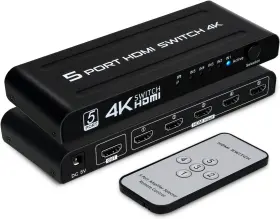
445032484436 DGODRT Hdmi Switch Port Switcher Selector Box Ir
| Brand | DGODRT |
|---|---|
| Part Type | REMOTE SWITCH SWITCHER BOX |
| Color | BLACK |
| Cable Type | HDMI |
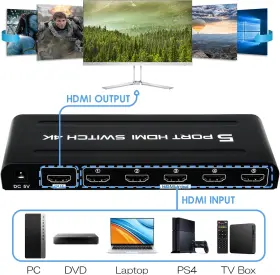
| Compatible Devices | TELEVISION, LAPTOP, PROJECTOR, PC, GAME CONSOLES, MONITOR |
| Size | 5 IN 1 OUT |
| UPC | 445032484436 |
Review DGODRT 4k Hdmi Switch In Out Port Switcher Selector Box Ir Remote Cont
The dgodrt 445032484436 4K HDMI Switch Port Switcher is a versatile and user-friendly device designed to seamlessly manage multiple HDMI devices connected to your TV or monitor.
This 4-port HDMI switch offers superior 4K resolution support for an optimized visual experience. Effortlessly switch between input sources, such as gaming consoles, Blu-ray players, or media streamers, at the press of a button. With the included IR remote control, you can easily navigate through your connected devices without having to leave your seat.
Equipped with the latest HDMI technology, this switcher allows for high-speed data transfer and automatic display mode identification, ensuring optimal performance with your connected devices. It is backwards compatible with older HDMI standards, making it a perfect solution for a wide range of home entertainment systems.
The compact and sleek design of the switcher box blends effortlessly into your home theater setup. The IR remote control boasts an intuitive layout, providing quick access to the functions you need, such as power, mute, and source selection.
This HDMI switcher offers numerous benefits, including automatic input switching, which automatically switches the active input source on the TV based on the connected device being used. It also features an energy-saving standby mode to help reduce power consumption when not in use.
In summary, the dgodrt 445032484436 4K HDMI Switch Port Switcher is an essential addition to any home entertainment system, offering seamless 4K resolution support, effortless device management, and a user-friendly design. With its powerful IR remote control capabilities, you can enjoy the convenience of easily switching between your favorite devices without the need for complicated setup procedures or manual input selection. Upgrade your home theater experience with this advanced and versatile HDMI switch.
Pros and Cons of Buying a 4K HDMI Switch Port Switcher (Model: DGODRT 445032484436) with IR Remote Controlled
Introduction:The DGODRT 445032484436 is a 4K HDMI switch port switcher that allows users to seamlessly switch between multiple HDMI sources without the need to manually unplug and re-plug cables. This device, equipped with an IR remote controller, offers convenience and flexibility for users with multiple devices. In this analysis, we will discuss the merits and demerits of investing in this HDMI switch.
Pros:1. Multiple HDMI Inputs: The device offers the ability to connect up to 5 HDMI sources, allowing users to switch between different screens, consoles, or streaming devices with ease.
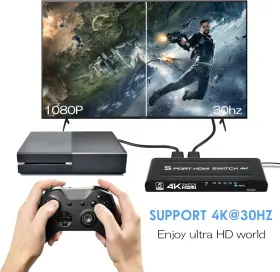
2. 4K Resolution Support: This switch supports 4K resolution, providing users with a high-quality viewing experience for movies, games, or other multimedia content.
3. IR Remote: The IR remote control makes switching between sources a breeze without the need to access each device's individual remote control.
4. HDCP Compliance: It is HDCP compliant, ensuring secure transmission of digital copyrighted content between the devices.
5. Automatic Source Detection: The system detects the active source automatically upon connection, reducing the hassle of manually switching sources.
Cons:1. Lack of Power Pass-through: This switch does not provide power pass-through to the connected devices, meaning users will have to keep the power sources separate for each device.
2. Limited IP Control: The device does not offer IP control, which may deter advanced automation users who prefer using apps or other control systems to manipulate their devices.
3. Potential Delay: Switching between sources might come with a small delay, affecting the overall responsiveness, especially noticeable when using this device for online gaming.
Conclusion:Overall, the DGODRT 445032484436 4K HDMI switch port switcher with an IR remote controller is an excellent investment for individuals with multiple HDMI sources in their home entertainment setup. Its ability to support 4K resolution, automatic source detection, and compact design make it a worthwhile addition to any home theater or gaming setup. While it lacks some advanced features like IP control and power pass-through, its ease of use and convenience justify its purchase.
Details:
4k 30hz high resolution - the 5 port hdmi selector switch supports resolution up to 4k 3840 2160 30hz, HTTP, Dr, 3d, 1080p, 720p. Or control your device more intelligently through automatic switching function. Suitable for home theater, office, meeting and other scenario. Not 1 input 5 output. Wide use: widely used in all kinds of multimedia, advertising, conference, financial securities and other fields, such as multimedia computer demonstration, video teaching, public broadcast system.
So make sure the switcher supports device to be connected and is compatible with monitor or TV. Hdmi switch 5 in 1 out - the 5x1 switcher allows you to connect up input source devices hd TV, monitor or projector. 4k hdmi switch 5 in 1 out, port switcher selector box with ir remote control auto switch, support 30hz, Dr, 1.4, HTTP, 3d, 1080p for HDTV ps3 ps4 box projector Blu-ray player:: brand name Dgodrt, color black, cable type hdmi, compatible devices television, laptop, projector, pc, game consoles, monitor, connector number of ports 5, manufacturer size out. Hdmi cable not included.
Copy mode is selected. Automatic signal detection. And easily switch between games and movies. When all ports are plugged into the device, unplug any port and device will automatically detect switch.
Switching ways: button switch. 2.the hdmi switcher needs to be set up or configured correctly before use. 1.hdmi switches are not compatible with specific devices or sources. When you use it, can check whether the connection cable is good, make sure device in correct working condition, and determine monitor has been switched to hdmi mode.
For laptops, an hdmi cable is required to connect the computer switcher and make sure that correct display mode made of sturdy metal, which is solid and good heat dissipated, ensuring excellent signal transfer. For desktop computers and discrete graphics cards, make sure the hdmi cable is connected to output port of card, not motherboard. Please refer to the switchers instruction manual or manufacturers recommendations ensure that switcher parameters are set correctly.
Power adapter.
specifications vcinterconnects:
- brand: Dgodrt
- part type: Remote Switch Switcher Box
- color: Black
- cable type: Hdmi
- compatible devices: Television, Laptop, Projector, Pc, Game Consoles, Monitor
- size: 5 In 1 Out
- upc: 445032484436
seller vcinterconnects:
- city: denver, colorado
- rating: 100.0%
- # reviews: 2
shipping vcinterconnects:
- type: fixed
- transit: 4-9 days
- service: standard
- class: standard
offer vcinterconnects:
- availability: in stock
- options: ship-to-home
- price: $34.79
- item condition: New
- in stock #: 1
- started: december 8, 2024
- sold #: 29
returns vcinterconnects:
- method: money back
- policy: returns accepted
- time: 30 days
- paid by: seller
payments vcinterconnects:
- credit card: diners-club
- other
- wallet: paypal
general vcinterconnects:
- category: Electronics > Tv, Audio > Accessories > Video Cables Interconnects
Similar Items:
- Dgodrt 751031872998 4k Hdmi Switch 5 In 1 Out Port Switcher Selector Box With Ir Remote Max input hdmi cable length up to 5m 16.4FT and output 25M 82FT. Hdmi cable not included, 3 switching methods - the 4k switch box supports auto, manual and ir remote switching methods. Suitable for home theater, office, meeting and other scenario. Not 1 input 5 output, 4k 30HZ high resolution - ...(October 10th, 2024)
- Dgodrt 736081621468 4k Hdmi Switch 5 In 1 Out 60hz Port 5x1 Switcher Box With Remote Co And there are heat dissipation holes on both sides to allow the switch dissipate quickly, ensure stable signal transmission and extend its service life. 3 switching methods - 4k 60HZ hdmi switch comes with a remote control, you can use it to switch without getting up from your seat, or via the panel...(November 21st, 2024)
- Dgodrt Hs1214 4k 1x12 Hdmi Splitter 1 In 12 Out Port Powered Distributor duplicato Compatible devices: projector, gaming console, television, personal computer. Item model number: HS1214. Country of origin: china. Number of ports: 12. Package dimensions: 13.78 x 5.08 2.91 inches. Brand: Dgodrt. 4k 1X12 hdmi splutter 1 in 12 out, port powered distributor/duplicator support 4KX2K ...(December 27th, 2024)
- Dgodrt 714684414458 8k Hdmi 2.1 Switch 4k 120hz Splitter Bi-directional Switcher 2 In 1 Out Supp With the led indicator, you can easily know which connected hdmi device is active. Just simply push the button on selector box to make shift of input or output source. Plug and play - easy to use. Input and output AWG26 hdmi standard cable can reach up to 5m 16.4FT. Not compatible with arc and ARC. ...(February 5th, 2025)
- Dgodrt Hs801-t 8 1 Hdmi Switch In Out Port 4k Switcher Selector Box With Compatible devices: laptop, gaming console, monitor, DVD player, Blu-ray player. Output: TV, monitor, projector, etc. Hdmi switch with remote - Dgodrt 8 port switch can input source devices to a single display via ir remote control. When a new hdmi input source is inserted or the current device ...(September 7th, 2025)
- Dgodrt Ks901d 4k Hdmi Switch Splitter 2 In 4 Out 60hz 2x4 Matrix W Product dimensions: 6.89 x 2.56 0.87 inches. Cable type: hdmi. You can switch input sources by ir remote control or manually. Easy to set up and operate. Item model number: KS901D. Brand: Dgodrt. Output support: HDTV, projector, monitor, etc. Compatible devices: television, laptop, projector, pc, ...(September 12th, 2025)
