- TV Video Cables & Interconnects Items
- sku: 12217955177209603
- FUERAN A-123
A-123 FUERAN Hdmi Edid Emulator Video Splitters Switches Rece
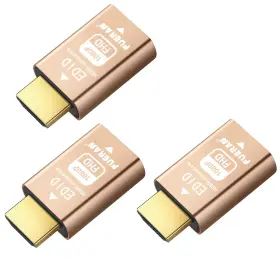
| Brand | FUERAN |
|---|---|
| Manufacturer Part Number | A-123 |
| Part Type | VIDEO SPLITTER EXTENDER |
| Power Plug Type | TYPE EF 2PIN EU |
| Connector Type | HDMI |
| Specific Uses For Product | VIDEO SPLITTING, HDMI SIGNAL MANAGEMENT, DISPLAY EMULATION |
| Item Shape | ROUND |
| Model Number | 1920X1080 60HZ-3P |
| Compatible Devices | WINDOWS, MACOS, LINUX, AND CHROMEOS SYSTEMS |
| Unit Count | 3.0 |
| UPC | 763032085239 |
| Package Dimensions Lxwxh | 5.83X4.65X0.59 INCHES |
| Weight | 0.11 POUNDS |
Review FUERAN Hdmi Edid Emulator Through For Video Splitters Switches Extenders And Av Rece
Introducing the Fueran A-123 HDMI EDID Emulator, an essential accessory for anyone using HDMI video splitters, switches, extenders, or receivers. This versatile device is designed to ensure optimal video performance and compatibility between various HDMI devices.
The A-123 HDMI EDID Emulator functions as a smart intermediary between your source device and your HDMI display or distribution system. It emulates the EDID (Extended Display Identification Data) of the source device, providing the display with accurate and compatible information. This ensures that your video signal is transmitted correctly, preventing potential issues such as incorrect resolution, color depth, or even no display at all.
This device is particularly valuable for users with complex HDMI setups, such as those utilizing multiple displays, long distance HDMI transmission, or HDMI switching. By emulating the EDID data, the Fueran A-123 HDMI EDID Emulator allows for seamless communication between your devices, resulting in crystal-clear visuals and a hassle-free experience.
The compact design of the Fueran A-123 HDMI EDID Emulator makes it easy to integrate into any setup. It supports HDMI 1.4b and is compatible with 1080p and 4k resolutions. With its plug-and-play functionality, you can quickly connect it to your system without the need for additional drivers or software.
In summary, the Fueran A-123 HDMI EDID Emulator is an indispensable tool for anyone dealing with HDMI video distribution systems. It ensures compatibility and optimal performance, making it an essential addition to your home theater or professional setup.
A HDMI EDID emulator, such as the A-123 model, is a device designed to solve compatibility issues between different HDMI devices. When using video splitters, switches, extenders, or receivers, HDMI handshaking issues can arise due to differences in EDID (Extended Display Identification Data) information. EDID is crucial for proper video resolution, refresh rate, and color depth settings between devices.
Pros of buying an A-123 HDMI EDID emulator:1. Improved compatibility: The emulator can resolve EDID handshaking issues between different HDMI devices, ensuring optimal video performance.
2. Simplified setup: By providing standard EDID information, the emulator can simplify the setup process when using multiple HDMI devices.
3. Versatile: The A-123 model can be used with various HDMI devices, including splitters, switches, extenders, and receivers.
4. High-quality video: By ensuring accurate EDID data transfer, the emulator can help maintain high-quality video output.
Cons of buying an A-123 HDMI EDID emulator:1. Cost: An HDMI EDID emulator like the A-123 model may come with a higher price tag compared to other HDMI devices.
2. Complexity: While the emulator can simplify the setup process for some users, others may find the additional device and setup steps confusing or unnecessary.
3. Limited use cases: While the A-123 model can be used with various HDMI devices, its use is primarily limited to resolving EDID handshaking issues.
In conclusion, an A-123 HDMI EDID emulator can be a valuable investment for users experiencing compatibility issues with HDMI devices, such as video splitters, switches, extenders, and receivers. Its ability to provide standard EDID information and ensure high-quality video output can save time and frustration during the setup process. However, its higher cost and limited use cases may deter some users. Ultimately, the decision to purchase an HDMI EDID emulator depends on the user's specific needs and the extent of any EDID compatibility issues they encounter.
Recommendation: If you frequently encounter EDID handshaking issues between HDMI devices, an A-123 HDMI EDID emulator can be a worthwhile investment to simplify your setup process and ensure optimal video performance. However, if you rarely encounter such issues, the additional cost and complexity may not be justified. Consider your specific use case and the potential benefits before making a purchase.
Details:
The default resolution 1920X1080 60hz maximum 60hz, hdmi edid emulator perfect matching synchronous our advanced technology guarantees flawless synchronization, keeping your displays and pc in perfect sync all the time, edid emulator solve a loss of issue with multiple. Enjoy uninterrupted visuals without no more desktop re-arranging each time you power on or off a TV.insert edid turn the TV even unplug hdmi and your pc won't skip beat!, multipurpose: an emulator can be used to remotely manage display settings. Virtual monitor functionality: our hdmi-compatible edid works as a virtual monitor when not in use. Simply close your laptop lid and resume work at preferred resolution.
Resolution required for various splicing: default resolution including 1024x768 60hz, 1280x720 60hz 1280x800 1920X1080 1920x1200 and 3840x2160. By copying or ghosting an edid, the emulator can relay information from display to computer.our hdmi edid emulator offers exceptional versatility, supporting various pixel formats CBC 4:4:4, 4:2:2, 4:2:0, GB and 2.1 ch audio. Enjoy the convenience of designated.
Whether you are managing a multi-monitor setup, simplifying device connections, or avoiding frequent edid adjustments, this emulator provides ultimate stability and convenience. An edid emulator can be used for testing and troubleshooting purposes.edid fixing compatibility problems between video scalier monitor.our help to improve the performance of display devices, reduce downtime, simplify management.
specifications vcinterconnects:
- brand: Fueran
- mpn: A-123
- part type: Video Splitter Extender
- power plug type: Type Ef 2pin Eu
- connector type: Hdmi
- specific uses for product: Video Splitting, Hdmi Signal Management, Display Emulation
- item shape: Round
- model number: 1920x1080 60hz-3p
- compatible devices: Windows, Macos, Linux, And Chromeos Systems
- unit count: 3.0
- upc: 763032085239
- package dimensions lxwxh: 5.83x4.65x0.59 Inches
- weight: 0.11 Pounds
payments vcinterconnects:
- other
- credit card: mastercard
- wallet: paypal
returns vcinterconnects:
- policy: no returns
offer vcinterconnects:
- availability: in stock
- sold #: 5
- prices: $12.31–$31.78
- item condition: New
- started: april 25, 2026
- in stock #: 4
- options: ship-to-home
seller vcinterconnects:
- city: brentwood, new york
- # reviews: 935
- rating: 99.6%
shipping vcinterconnects:
- service: standard
- class: standard
- transit: 5-11 days
- type: fixed
general vcinterconnects:
- category: Electronics > Tv, Audio > Accessories > Video Cables Interconnects
Similar Items:
- Fueran 763032085222 Hdmi Pass Signal Stabilizer Edid Buy more and safe. Used in exceptionally good condition...(May 27th, 2024)
- Fueran 602835399030 Hdmi 2.1 Dummy Plug 4k 120hz Virtual Display Emulator Headless Adapte Not an hdmi transmitter/receiver, advantage compatibility: applicable to any discrete graphics card, notebook with output,support pc windows, mac mini OS, linux, and other operating systems. 4.HEADLESS emulator compatible with a variety of remote software, such as team viewer, any desk, etc. 6.HDMI ...(August 8th, 2025)
- Fueran Gy-0254 Vga Em-edid-hd15 Pass-through Edid Emulator For Use With Video Splitters Swit Support audio/video sync output:VGA is originally of audio signal. Solve problems of some led large screens and screen jotter. It supports AMD multi-screen graphics splicing extension split screen mode, and affinity wide-domain mode when the monitor line is plucked out with electricity, TV wall ...(October 9th, 2025)
