- TV Video Cables & Interconnects Items
- sku: 8073997008683762
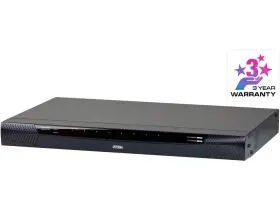
- ATEN KN1108VA
KN1108VA ATEN Access Cat Kvm Ip Switch
| Brand | ATEN |
|---|---|
| Manufacturer Part Number | KN1108VA |
| Type | TOOL |
| Country/region Of Manufacture | TAIWAN |
| UPC | 672792403873 |
Review ATEN 1-local/1-remote Access 8-port Cat Kvm Over Ip Switch
The Aten TEK8121-K1108VA 1-Local/1-Remote Access 8-Port KVM IP Switch (Model: KN1108VA) is an advanced data center solution designed to provide efficient and secure management of multiple servers or IT equipment. This KVM switch supports both local and remote access, allowing you to control up to eight devices from a single console using a standard VGA, PS/2, or USB keyboard, mouse, and monitor.
The KVM IP Switch features an intuitive web-based interface for easy configuration and management. With its IP address management function, you can easily assign static or dynamic IP addresses to each port, ensuring seamless access to your devices. Additionally, the KVM IP Switch supports secure remote access via SSL encrypted connections, ensuring the highest level of data security.
This 8-port KVM IP Switch also comes with advanced features such as hotkey support, which enables you to define custom hotkeys for frequently used functions. It also supports power control, allowing you to turn connected devices on or off remotely. The KVM IP Switch includes an integrated power distribution unit (PDU) with auto-sensing technology, ensuring that each connected device receives the appropriate power supply.
The KVM IP Switch is made of high-quality materials, with a robust metal housing that provides excellent ventilation to ensure stable operation in various environmental conditions. It also features a user-friendly design, with clearly labeled ports and easy-to-use controls. The KVM IP Switch comes with a comprehensive installation guide and user manual, making it easy to set up and use.
Overall, the Aten TEK8121-K1108VA 1-Local/1-Remote Access 8-Port KVM IP Switch (Model: KN1108VA) is an ideal solution for data centers, server rooms, and IT environments that require efficient and secure management of multiple servers or IT equipment. With its advanced features, easy-to-use interface, and robust design, this KVM IP Switch offers exceptional value and performance for IT professionals and organizations.
The Aten KN1108VA is a 1-local/1-remote access 8-port KVM IP switch that allows users to control multiple computers from a single console using an Ethernet network. Here are some pros and cons of buying this device:
Pros:1. Remote Access: The KN1108VA enables remote access to connected computers, making it an ideal solution for managing servers, workstations, or other devices located in different locations.
2. IP-based KVM Switching: IP-based switching offers more flexibility and convenience as compared to traditional KVM switches. Users can switch between computers using IP addresses instead of manually pressing a button.
3. Supports Multiple Platforms: This KVM switch supports various operating systems, including Windows, Linux, and Mac OS, making it suitable for diverse IT environments.
4. Secure Access: The device offers multiple security features, such as user authentication, role-based access control, and SSL encryption, ensuring secure access to connected computers.
5. Easy to Install: The KN1108VA is easy to install and configure. It comes with a user-friendly web interface, which allows users to set up the device without any complex configurations.
Cons:1. Cost: The KN1108VA is more expensive compared to traditional KVM switches. This might be a significant drawback for small businesses or individuals with limited budgets.
2. Requires a Stable Network: Since the KVM switch relies on an Ethernet network for connectivity, a stable network is essential for smooth operation. Any network disruptions can impact the performance of the device.
3. Limited Number of Ports: The device offers only eight ports, which might not be sufficient for larger IT environments that require managing a more significant number of devices.
In conclusion, the Aten KN1108VA is a feature-rich KVM IP switch that offers remote access, flexibility, and security. While it has some limitations, such as cost and the requirement for a stable network, its benefits outweigh the cons. If you're in need of an IP-based KVM switch for managing servers, workstations, or other devices, the KN1108VA is a solid investment. However, if you have a limited budget or only require a small number of ports, you might want to consider other options.
Details:
Blade server support. Updates, or perform diagnostics across a network with ease.features:: hardware high port density Jr-45 connectors for up to 8 ports in 1u housing. With powerful new features such as power association kvm ports can be associated with Aten pud power outlet's for management of servers from the over ip switches user interface.supports Aten KN1108VA switch now supports control video session recorder CVS software. Remote authentication support: radius, lap, laps, and ms active directory.
Photos are greatly appreciated. Virtual media support let's you map DVD-CD-ROM's and other storage media to a remote server. Keyboard/mouse broadcast keyboard and mouse inputs can be duplicated on all the attached servers. In addition, it offers out-of-band access with external modem support for bios-level troubleshooting when the network is down.to help you manage and control an entire data center, KN1108VA kvm over ip switch supports blade servers chassis.
Works with USB enabled servers in operating system and bios level. Ip/mac filter for enhanced security protection. On-screen keyboard with multi language support. Dual power supply.
Two 10/100/1000 bps nicks for redundant LAN or two ip operation. Out-of-band access modem dial-in/dial-out/dial-back support. Magic panel a special hideaway control panel with configurable function icon. Exit macros support.
Event logging and windows-based log server support. Every operation and change from the bios level to logging in, running software applications configuring operating system is recorded saved a secure video file as evidence, without exception.the virtual media function let's you map storage media on USB, hard disk DVD/CD drives located remote servers allowing administrators conduct transfers, install applications, run.s. Mouse dynastic - automatically synchronizes the local and remote mouse movements. Video syncing with the local console monitors did information stored on kvm adapter cables for display resolution optimization.
The CVS records all operations made on servers accessed through kvm over ip switches. Two separate buses for one local console access and remote over ip. Panel array mode available to both local console operators and remote access users. Full-screen or sizable and salable virtual remote desktop.
Full screen video display or salable. Bios-level access. Port share mode allows multiple users to gain access a server simultaneously. Message board for communication among remote users.
Support DVD/CD drives, USB mass storage devices, pc hard drives and ISO images. Keyboard pass through support. Audio enabled. End session feature administrators can terminate running sessions.
Virtual remote desktop video quality and video tolerance can be adjusted to optimize data transfer speed; monochrome color depth setting, threshold noise settings for compression of the band width in low situations. Virtual media enables file applications, OS patching, software installation and diagnostic testing. Integration with Aten CVS video session recording software. Please consider troubleshooting prior to making a return request.
Configurable user and group permissions for server access control. Power association enables the switch's kvm ports to be associated with Athens puds power outlet's for remote management of servers from interface. Multi platform client support windows, mac OS x, Linux, sun.
specifications vcinterconnects:
- brand: Aten
- mpn: Kn1108va
- type: Tool
- country/region of manufacture: Taiwan
- upc: 672792403873
returns vcinterconnects:
- policy: returns accepted
- paid by: seller
- time: 30 days
- method: money back
general vcinterconnects:
- category: Electronics > Tv, Audio > Accessories > Video Cables Interconnects
seller vcinterconnects:
- rating: 98.9%
- city: worcester, pennsylvania
- # reviews: 11447
shipping vcinterconnects:
- transit: 5-10 days
- type: fixed
- class: economy
- service: economy
offer vcinterconnects:
- started: august 31, 2025
- options: ship-to-home
- sold #: 16
- prices: $216.48–$1643.00
- item condition:
- Used
- New
- Brand New
- availability: in stock
payments vcinterconnects:
- other
- wallet: paypal
- credit card: discover
Similar Items:
- Vancryst Ve170rq Aten A v Over Cat5 Receiver Aten encrust a/v over CAT5 receiver VE170RQ. 14 day DOA warranty on tested working product. Sorry no FPO or APO...(December 21st, 2023)
- Atem Ueh4002l Aten 4-port Usb 2.0 Extender With A c Adapter Used Free Shipping No less, no more. Shipping handling. You can ship by your FedEx account or using label. Aten 4-PORT USB 2.0 extender UEH4002L w/ a/c adapter / used - free shipping. Caused by unclear. Whats included. Return exchange...(June 5th, 2024)
- Aten Ka7166 Usb Dvi Virtual Media Kvm Adapter With Smart Card Support Used functional with 30 day warranty pictures of actual item BOX201...(July 8th, 2024)
- Aten Vc812 Hdmi To Vga Converter With Scaler Used, working condition. Nothing else is included, only what seen in the pictures. Photos taken on a 1 cm grid. This listing is for a Aten VC812 HDMI to VGA converter with scalier. Measurement tools not included with this listing only used to show dimensions of the item. Comes as shown in the ...(September 16th, 2024)
- Aten Ve814at Hdmi Hdbaset Transmitter With Dual Output Featuring dual synchronous outputs, the VE814AT can transmit a video signal to two remote displays and one at local side. Supports wide screen format. Aten VE814AT extends HDMI signals to one local and two remote displays up 100 m over a single cat 5E/6/6A or Aten 2L-2910 6 cable.HDMI 3D, deep color...(March 11th, 2025)
- Aten Vs194 4-port True 4k Displayport Splitter Sst Split Or Mst Extended Display Video output: 4 x display port female black - input: 1 max distance 4.6M 4096 2160 / 3840 at 60HZ with Aten 2L-7D04DP. Supports resolutions up to 4096 x 2160 / 3840 at 60 Hz with 21.6 GPS 5.4 per lane. Supports MST/ extend mode and SST/ split - link rate: HBR2 high bit rate compatible with display ...(May 1st, 2025)
- Aten Kn1116va 1-local 1-remote Access 16-port Cat 5 Kvm Over Ip Switch With Out-of-band access modem dial-in/dial-out/dial-back support. Power association enables the switch's kvm ports to be associated with Athens puds power outlet's for remote management of servers from interface. Blade server support. Works with USB enabled servers in operating system and bios level. End...(May 7th, 2025)
- Aten Vp1920 9 X 2 4k Presentation Matrix Switch 17.21 6.44 1.73 Inches Delectable matrix, mirror and pip modes to meet the needs of various events or presentation styles. Superior video quality up to 4096 x 2160 60HZ 4:2:0 / 30HZ 4:4:4 HDMI/DP. Aten VP1920 9 x 2/4 k presentation matrix switch 17.21 6.44 1.73 inches: multi-format av fast switching fast switching among 6...(May 18th, 2025)
- Aten 672792008689 Us3324 2 X 4 Usb 3.1 Gen1 Peripheral Sharing Switch USB 3.1 GEN1 compliant, supporting data transfer rates of up to 5GBPS. Photos are greatly appreciated. Leds indicates which computer is active. Please consider troubleshooting prior to making a return request. Plug and play no drivers or external power adapter needed. Multi platform support windows...(June 18th, 2025)
- Aten Cl5716in 16-port 19ft Lcd Integrated Ip Usb ps2 Combo Kvm With Daisy-chain Multi language web ii support featuring a tree-structured local and remote ODs. Mouse dynastic. Please consider troubleshooting prior to making a return request. Message board allows logged-in users to communicate with each other, and a user take exclusive control of the kvm functions. The ability ...(June 23rd, 2025)
- Aten Ve8900t Full Hd Hdmi Over Ip Transmitter Simple configuration that requires no extensive it experience or extra learning. Separate audio signal can be embedded into the HDMI stream. Connects multiple displays through a single port to utilize every of the network switch and maximize their value. Supports up to 8 x video wall 64 displays. Bi...(June 26th, 2025)
