- TV Video Cables & Interconnects Items
- sku: 12554857597223892
- AGFINEST SCHD-536
SCHD-536 AGFINEST Hdmi Splitter Dual Monitors Usb Adapter Mir
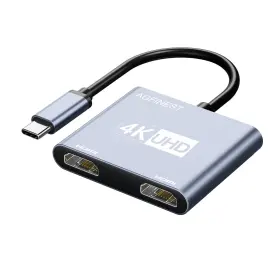
| Brand | AGFINEST |
|---|---|
| Manufacturer Part Number | SCHD-536 |
| Part Type | SPLITTER MONITOR ADAPTER |
| Power Plug Type | NO PLUG |
| Connector Type | HDMI, USB TYPE C |
| Control Method | TOUCH |
| Connector Gender | MALE-TO-FEMALE |
| Finish Type | MATTE |
| Color | GREY |
| Model Number | 572-FR |
| Compatible Devices | LAPTOP |
| Unit Count | 1.0 |
| Package Dimensions Lxwxh | 6.81X4.21X0.59 INCHES |
| Weight | 0.09 POUNDS |
Review AGFINEST Hdmi Splitter For Dual Monitors Usb-c To Adapter 4k 60hz Extend Mir
Introducing the AG Finest Schd-536 HDMI Splitter with USB-C Adapter, an innovative solution designed for users looking to extend their laptop's display to two monitors in 4K resolution at 60Hz. This versatile device comes with an HDMI splitter and a USB-C adapter, providing a seamless connection between your laptop and two external monitors.
The HDMI splitter is a high-performance accessory that splits the HDMI signal from your laptop into two identical outputs. It supports 4K resolution at 60Hz, ensuring crisp and clear visuals on both monitors for an immersive multitasking experience. The Schd-536 model is engineered with advanced technologies to maintain the signal quality, preventing any potential loss of data or interference.
The USB-C adapter, on the other hand, serves as a convenient connection point for transferring data and charging your laptop while using the external displays. It supports USB 3.1 Gen 1, offering a maximum data transfer rate of 5Gbps. The adapter also features a USB-C PD (Power Delivery) technology that provides up to 60W power, making it suitable for charging most modern laptops.
This AG Finest product is compact and lightweight, constructed with premium materials to ensure durability and reliability. Its plug-and-play design makes it easy to use, with no additional software or drivers needed for setup. Moreover, the device is compatible with various operating systems, including Windows, MacOS, and Linux.
In summary, the AG Finest Schd-536 HDMI Splitter with USB-C Adapter is an excellent choice for professionals and enthusiasts seeking to improve their productivity by expanding their laptop's display capabilities. With its support for 4K resolution at 60Hz, data transfer rates of up to 5Gbps, and the ability to charge your laptop, this versatile adapter offers a convenient and efficient solution for a dual-monitor setup.
The AGFINEST Schd-536 HDMI splitter with USB-C adapter for dual monitors supporting 4K resolution at 60Hz with extend mode has the following pros and cons:
Pros:1. Supports 4K resolution at 60Hz for dual monitors, which is essential for high-performance multitasking and graphics-intensive applications.
2. HDMI splitter allows you to connect multiple displays to a single source, reducing the number of cables required and simplifying setup.
3. USB-C input provides power delivery, allowing you to charge your laptop or other USB-C devices while using the adapter.
4. Extend mode allows you to extend your desktop across both monitors, increasing your productivity by providing more screen real estate.
5. Affordable price compared to other similar adapters in the market.
Cons:1. Some users have reported compatibility issues with specific laptop models or operating systems. It is essential to check the compatibility of your device before purchasing.
2. The build quality of the adapter is not the best, and some users have reported issues with the durability of the cable and connector.
3. The adapter may not support HDR (High Dynamic Range) or other advanced display technologies.
Ending Conclusion:The AGFINEST Schd-536 HDMI splitter with USB-C adapter is an affordable and practical solution for users who need to connect dual monitors to their laptop or PC while supporting 4K resolution at 60Hz. However, it is essential to check the compatibility of your device and be aware of the potential build quality issues. Overall, this adapter is a good value for the price and provides an excellent solution for users who require dual 4K monitors for their work or gaming setup.
Recommendation:If you need a reliable and high-performance solution for dual 4K monitors, I would recommend considering other brands with better build quality and broader compatibility, such as Plugable, StarTech, or Club3D. These brands offer more robust and durable solutions, and their adapters are known to support a wider range of devices and operating systems. However, they come with a higher price tag compared to the AGFINEST adapter. Ultimately, the choice depends on your budget and the specific requirements of your setup.
Details:
This adapter does not support bidirectional transmission; it only supports unidirectional usb-c source signal transmission to an hdmi display device. For example, this adapter cannot be used with hp pavilion/Leno idea pad. This usb-c to dual hdmi adapter transforms your device into a powerful multi-display workstation. Note: not compatible with all usb-c port devices.
Using this usb-c to dual hdmi port splitter, you can extend a single display into multiple displays, allowing work on different projects across screens. Add two hdmi ports to your laptop or tablet connect multiple monitors projectors. Compatible with usb-c devices that support display port alt mode, including mac book, iPad pro, dell cps, steam deck, and more. Usb-c to dual hdmi adapter: this 1-in-2-out adapter supports extension and mirroring modes.
This hdmi splitter is fully compatible with thunderbolt 3/4-compatible devices such as mac book, mac book pro2015-2019, air 2018, iPad pro 2018, dell cps 12/13/15, surface book, google Chromebook pixel, Leno yoga, Samsung s8/s9/s9, and more. Its perfect for remote workers, teachers, and business users who need to boost productivity through multi-screen workflows or deliver imperatively presentations. Constructed from durable aluminum, it ensures excellent heat dissipation and portability, fitting easily into your travel bag or office drawer. No drivers or software installation is required to quickly enjoy dual display functionality.
Vibrant images deliver more stunning screen color and contrast, whether for work or entertainment. Connect the usb-c male end of adapter to your device, then connect hdmi cable and display. An ideal usb-c accessory for photography, programming, data analysis, home theater, and other scenarios. The adapter supports both extended and mirror display modes, with no driver required just plug play.
specifications vcinterconnects:
- brand: Agfinest
- mpn: Schd-536
- part type: Splitter Monitor Adapter
- power plug type: No Plug
- connector type: Hdmi, Usb Type C
- control method: Touch
- connector gender: Male-to-female
- finish type: Matte
- color: Grey
- model number: 572-fr
- compatible devices: Laptop
- unit count: 1.0
- package dimensions lxwxh: 6.81x4.21x0.59 Inches
- weight: 0.09 Pounds
payments vcinterconnects:
- credit card: discover
- other
- wallet: google-pay
returns vcinterconnects:
- method: money back
- paid by: seller
- policy: returns accepted
- time: 14 days
general vcinterconnects:
- category: Electronics > Tv, Audio > Accessories > Video Cables Interconnects
offer vcinterconnects:
- price: $33.32
- item condition: New
- availability: in stock
- sold #: 8
- started: may 16, 2026
- options: ship-to-home
- in stock #: 1
seller vcinterconnects:
- rating: 99.4%
- city: lathrop, california
- # reviews: 1712
shipping vcinterconnects:
- service: standard
- type: fixed
- class: standard
- transit: 5-8 days
Similar Items:
- Agfinest 763704124204 8k Display Port 1.4 To Hdmi 2.1 Adapter 4k120hz 8k60hz Unidirectional Dp H Product specifications: connector: display port to hdmi male female, resolutions: 8K60HZ, 4K120HZ, 2K240HZ, 1080P240HZ, features: hd Dolby 7.1 and atoms, HDR10,.2A, 3d surround audio, support: 1.4 / 2.1, direction: uni-directional from source display, materials: gold plated connectors aluminum alloy...(November 3rd, 2024)
- Agfinest 763704124020 8k Mini Displayport To Hdmi Cable 3.3ft Dp 1.4 Nylon Braided Alu Note: unidirectional transmission from mind to hdmi only. It provides crystal-clear video output with vibrant colors and sharp details, along features like Dr, VR, disc, HTTP. Wide compatibility: with display port 1.2 and newer POST-2015, this cable connects mind to hdmi devices like laptops, ...(November 4th, 2024)
- Agfinest S4071-2484 8k Display Port 1.4 To Hdmi 2.1 Adapter 4k 120hz 60hz Unidirectional Dp Hd Latest VMM7100 chip: this 8k DP to hdmi 2.1 adapter supports up 60HZ, 4k 120HZ, 2k 240HZ, plus features like all, disc, HDR10. Unidirectional: the display port to hdmi adapter only supports a DP source PC/laptop an monitor device. Why there is only 4k 60HZ option and how to get 120HZ: the display ...(April 17th, 2025)
- Agfinest 1011-1703 8k Displayport To Hdmi Cable 3.3ft 60hz 4k 240hz 2k 480hz Unidirectiona It must connect directly from your display port source desktops, laptops, and modern graphics cards to hdmi monitors, TVs, or projectors. Whether you re gaming, editing, or streaming, every frame is crisp, fluid, and true to life. Hear every nuance from a whisper in the wind to roar of crowd perfect...(March 22nd, 2026)
