- TV Video Cables & Interconnects Items
- sku: 5719891124432762
- MALARPON THOUGHT-30
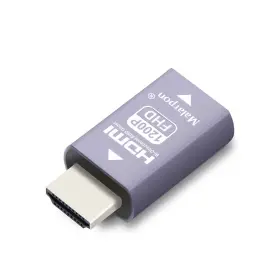
THOUGHT-30 MALARPON Hdmi Edid Emulator Passthrough Generrtion
| Brand | MALARPON |
|---|---|
| Manufacturer Part Number | THOUGHT-30 |
| Power Plug Type | NO PLUG |
| Connector Type | HDMI |
| Specific Uses For Product | MONITOR |
| Color | HDMI EDID 1200-1P |
| Model Number | HDMI PASS THOUGHT-30 |
| Compatible Devices | LAPTOP, MONITOR, PC |
| Unit Count | 1.0 |
| UPC | 295807751511 |
| Package Dimensions Lxwxh | 3.07X2.87X0.79 INCHES |
| Weight | 0.04 POUNDS |
Review MALARPON Hdmi Edid Emulator Passthrough 3rd Generrtion Aluminum Fit Headlessk
The MalarPon Thought-30 HDMI EDID Emulator is a third-generation headless device designed to simplify the process of passing HDMI signals through complex systems. This emulator is an essential tool for those dealing with HDMI signal compatibility issues, especially in professional AV environments, home theaters, or PC gaming setups.
The Thought-30 emulator works by emulating the EDID (Extended Display Identification Data) of a display device. EDID information is crucial for an HDMI connection to function properly, as it provides detailed specifications on the capabilities of the connected display. However, sometimes, the EDID data sent by a display might not be compatible with the source device, resulting in various display issues or system incompatibilities.
The MalarPon Thought-30 HDMI EDID Emulator addresses these issues by emulating the EDID data of a known, compatible display. By doing so, it ensures that the source device receives the correct EDID information, allowing it to properly configure the HDMI connection and optimize the display settings for an excellent viewing or gaming experience.
This compact, headless device is designed to be easily integrated into various systems. It features an HDMI input and an HDMI output, allowing you to connect it between the source and the display. The device is passive, meaning it doesn't require any external power source or additional cables, making it a convenient and straightforward solution for HDMI signal compatibility problems.
The Thought-30 emulator is part of MalarPon's third-generation HDMI EDID Emulator series, which builds upon the success of its predecessors by offering improved compatibility and performance. It supports a wide range of HDMI resolutions, including 1080p, 4k, and higher, ensuring that it can handle most modern display configurations.
In summary, the MalarPon Thought-30 HDMI EDID Emulator is an indispensable tool for anyone dealing with HDMI signal compatibility issues. Its compact, passive design makes it easy to integrate into various systems, while its ability to emulate the EDID data of a known, compatible display ensures optimal HDMI performance and display settings.
Malar 's Thought-30 HDMI EDID Emulator (3rd Generation Headless) is a device designed to help resolve HDMI handshake issues that can prevent GPUs from functioning properly in virtualization environments. Here are some potential pros and cons of buying this device:
Pros:1. Improves compatibility: With the ability to emulate EDID data, the Malarpan Thought-30 HDMI EDID Emulator can help improve compatibility between your virtualized GPU and your display, allowing you to use more monitors and resolutions in your virtual machines.
2. Easy to use: The headless design of this device means that it doesn't require a user interface or any additional software to be installed on your host system, making it easy to set up and use.
3. Versatile: The Malarpan Thought-30 HDID EDID Emulator can be used with a wide range of virtualization software, including VMware, VirtualBox, and QEMU, making it a versatile solution for many different use cases.
Cons:1. Cost: At around $100, the Malarpan Thought-30 HDMI EDID Emulator is not a cheap solution for resolving HDMI handshake issues.
2. Potential complexities: While the headless design of the device makes it easy to use in some ways, it can also make troubleshooting more difficult if you encounter issues. Additionally, if you're not familiar with virtualization or display technologies, you may find the concept of an EDID emulator confusing.
3. Limited functionality: While the Malarpan Thought-30 HDMI EDID Emulator can help improve compatibility with displays, it cannot address other issues that may arise when using virtualized GPUs, such as performance limitations or driver compatibility issues.
Conclusion:The Malarpan Thought-30 HDMI EDID Emulator can be a useful tool for improving compatibility with displays in virtualization environments, but it comes with some limitations and potential complexities. If you're experiencing frequent HDMI handshake issues and have exhausted other troubleshooting options, this device may be worth considering. However, if you're new to virtualization or have less complex setup requirements, there may be other, more cost-effective solutions available to you. Ultimately, the decision to purchase this device will depend on your specific use case and technical expertise.
Recommendation:If you're experiencing frequent HDMI handshake issues and have tried other troubleshooting options without success, the Malarpan Thought-30 HDMI EDID Emulator may be worth considering as a potential solution. However, if you're new to virtualization or have less complex setup requirements, you may want to explore other options first, such as updating your virtualization software or drivers, or using a different display or cable. Before making a purchase, be sure to carefully consider the pros and cons and determine if the benefits outweigh the costs for your particular setup.
Details:
1920x1200 60hz recommend. 2560x1440 60hz. Color:hdmi edid 1920x1200 59hz. Supported resolutions.
3840 x 2160 60hz.
specifications vcinterconnects:
- brand: Malarpon
- mpn: Thought-30
- power plug type: No Plug
- connector type: Hdmi
- specific uses for product: Monitor
- color: Hdmi Edid 1200-1p
- model number: Hdmi Pass Thought-30
- compatible devices: Laptop, Monitor, Pc
- unit count: 1.0
- upc: 295807751511
- package dimensions lxwxh: 3.07x2.87x0.79 Inches
- weight: 0.04 Pounds
payments vcinterconnects:
- credit card: visa
- wallet: google-pay
- other
returns vcinterconnects:
- policy: no returns
shipping vcinterconnects:
- transit: 3-8 days
- service: standard
- type: fixed
- class: standard
seller vcinterconnects:
- city: casper, wyoming
- # reviews: 477
- rating: 100.0%
offer vcinterconnects:
- options: ship-to-home
- availability: in stock
- sold #: 22
- in stock #: 1
- started: april 28, 2025
- price: $52.88
- item condition: New
general vcinterconnects:
- category: Electronics > Tv, Audio > Accessories > Video Cables Interconnects
Similar Items:
- Malarpon 295807751337 Hdmi Edid Emulator Passthrough 3rd Generrtion Aluminum Fit Headlesskeep The E How to fix PS5 120HZ not showing with edid emulator, STEP1:SELECT performance mode disable HTTP. Be sure 2560X1440 is supported for since that's what monitors use, but I am pretty 2560X1600 works too, color:hdmi edid 4K-1P, supported resolutions: 3840 x 216060HZ with HDMI2.0, 2560X144060HZ, ...(November 9th, 2024)
- Malarpon 295807749952 Hdmi Dummy Plug Fit-headless Display Emulator Ddc Edid Headless Ghos With W Inch Hdmi 4k 3840 216060HZ, thereby solving the most suitable working condition, can debug multiple resolutions, solve problem of insufficient single monitor, 3840 2160 23/24/25/29/30/60HZ this recommendation, 2560 1600 59/60HZ, 2560 1400 1920 2160 23/24/25/29/30/59/60HZ, 1920 1200 1920 1080 23/24/25/29/...(November 24th, 2024)
- Malarpon 295807751368 Hdmi Edid Emulator Passthrough 3rd Generrtion Aluminum Fit Headlesskeep Be sure 2560X1440 is supported for since that's what monitors use, but I am pretty 2560X1600 works too color:hdmi edid 4K-1PSUPPORTED RESOLUTIONS:3840 x 2160 60HZ with HDMI2.0 60HZ1920X1200 60HZ1920X1080 60HZ1680X1050 60HZ1600X1200 60HZ1600X900 60HZ1440 900 60HZ1366 X768 60HZ1280X800 60HZ1280X720 ...(January 4th, 2025)
- Malarpon 295807751382 Hdmi Edid Emulator Passthrough 3rd Generrtion Aluminum Fit Headlesskeep The E Color:hdmi edid 1920X1080 59HZ, supported resolutions: 3840 x 2160 60HZ with HDMI2.0, 2560X1440 60HZ, 1920X1200 60HZ recommend, 1680X1050 1600X1200 1600X900 1440 900 1366 X768 1280X800 1280X720 1024X768 800X600 product dimensions 1.61 0.83 0.43MM, item weight 0.6 oz, 59HZ...(March 8th, 2025)
- Brand Malarpon Thought-14 Hdmi Edid Emulator Passthrough 3rd Generrtion Aluminum Fit 4k-3p Color: hdmi edid 4K-3P. Sort of like a dummy plug. Compatible devices: monitor. Item model number: hdmi pass THOUGHT-14. Connector type: hdmi. Item dimensions l x w h: 1.6 0.5 0.8 inches. Hdmi edid emulator passthrough 3RD generrtion aluminum fit hdmi edid 4K-3P: dimensions: 1.6 x 0.5 0.8 inches. ...(March 15th, 2025)
- Malarpon 295807749914 Hdmi Dummy Plug Fit-headless Display Emulator Ddc Edid Headless Ghost 6pc Compatible with various devices, including desktops, this emulator is a convenient solution for those looking to enhance their viewing experience without the need separate display. The hdmi dummy plug fit-headless display emulator DC edid headless ghost 6PC is a versatile accessory designed to ...(March 14th, 2026)
